
As businesses grow, so do their technology requirements. New departments can introduce new systems, while existing teams such as sales, marketing, or IT may adopt different tools to manage information and processes.
Over time, this can leave organizations working across a fragmented technology environment, with information spread across multiple systems and teams spending more time moving data between platforms.
For growing businesses, the challenge isn’t simply finding the right technology. It’s creating an environment where different tools and teams can work together without adding unnecessary complexity and cost.
From scattered systems to a single platform
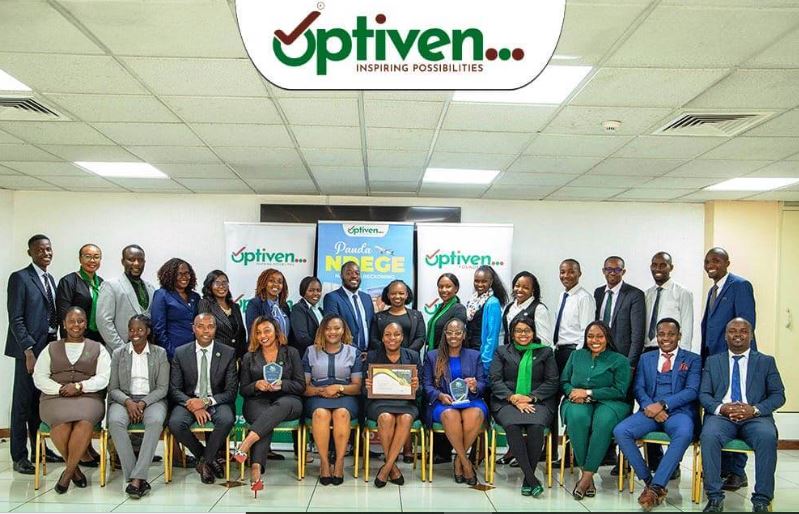
The Kenyan real estate group Optiven is one example of a business that has taken this approach. With operations spanning developments in Kitengela, Ngong, Ongata Rongai, and Kiambu, the company has technology requirements across sales, marketing, corporate affairs and ICT. With up to 80% of its systems being automated, technology plays a central role in how Optiven operates.
As its technology environment expanded, adding a new tool for every new requirement was no longer sustainable. The company turned to Zoho One, a unified system which brings together communication, collaboration, marketing and IT tools.
“For businesses in a similar position, consolidation is not just reducing the number of applications. It is about creating a technology environment that can support different teams while still maintaining easy processes and access to information,” says Veerakumar Natarajan, Country Head, Zoho Kenya.
Migrating to new software without putting the business on pause
Moving to a new technology environment can be complex, particularly for an organization managing hundreds of users and large volumes of existing data. For Optiven, the transition needed to happen without interrupting normal operations.
According to Nancy Muraguri, Head of ICT, Optiven Limited, the onboarding process was straightforward. With the help of Optiven’s partner HeartBit Solutions, more than 300 corporate email accounts were created within three days, while over 1 terabyte of data was transferred within a week. The speed of the migration meant the organization could move users and critical information without putting everyday operations on hold.
Muraguri describes Zoho as one of the best software platforms Optiven has used to date. She mentions the move brought applications including Zoho Mail, Zoho WorkDrive, Zoho Cliq, Zoho Desk, Zoho Forms, Zoho Campaigns, and Zoho Creator as a single system to a wider environment.
That range matters because business requirements extend beyond a single department. At Optiven, for example, the marketing team primarily uses Zoho Forms and Zoho Campaigns to develop surveys and questionnaires for campaigns and events. Other departments, meanwhile, must continue to operate seamlessly as part of the wider business. A unified environment enables organizations to meet these diverse needs without treating every new requirement as a separate technology project.
What does unified software actually look like in practice?
The impact of bringing systems together is most visible in the everyday work of the people using them. For Joseph Aando, General Manager of Optiven Limited, that includes being able to access Zoho Mail across all of his devices.
“I love Zoho Mail because you can have it on your laptop and your phone,” he says. This provides him with the flexibility to work even when he’s away from his desk. He also mentions that the business uses Zoho Sheets for spreadsheets, documentation, and reports.
For Kate Khasoa-Kole, Corporate Affairs Manager at Optiven Group, the user interface and integration capabilities are important considerations when choosing a system. She explains that evaluating these factors is what led Optiven to choose Zoho. Zoho Mail remains one of the team’s key tools, and access to reports enables information to be received quickly and accurately.
Other applications support more specialized workflows. Zoho Creator and Zoho Desk are used mainly by the ICT department for building custom applications and handling ticketing and IT support, while WorkDrive and Cliq support file management and collaboration.
For Muraguri, this is where consolidation offers practical value. Teams don’t necessarily need identical workflows, but they do need technology that can accommodate those differences without creating more silos. For a growing business, that flexibility makes it easier to introduce new processes and adapt existing ones as requirements change.
The cost of bringing it all together
Optiven’s technology decision has delivered measurable financial and operational benefits. Muragurihighlights the cost savings as another benefit, noting that by moving to Zoho, the business has reduced its software costs by 40% compared to its previous solution.
This cost reduction reflects the benefit of moving away from a collection of separate software solutions. Simultaneously, automation reduces the manual work involved in routine processes, allowing teams to spend less time managing administrative tasks and more time focusing on their core responsibilities.
“For any enterprise operating across multiple functions and locations, this is a factor worth serious consideration,” Natarajan concludes. “The technology needs to support the work happening within the organization without adding more layers of cost and complications.”
Optiven’s experience also shows that the impact of consolidation isn’t limited to the IT department. The same technology environment supports communication, reporting, marketing, field data collection, collaboration and internal support, connecting technology more closely to the work different teams are already doing.
For Optiven, the move has changed how its teams work with technology day to day. For Lando, that includes the flexibility to work beyond his desk: “The biggest advantage of using Zoho for me is the flexibility it offers, especially being able to use it on the go. I would easily recommend Zoho,” he says.
Khasoa-Kole also points to the wider experience of using the system across the business. “I definitely would recommend Zoho for its versatility, efficiency and dependability,” she concludes.