

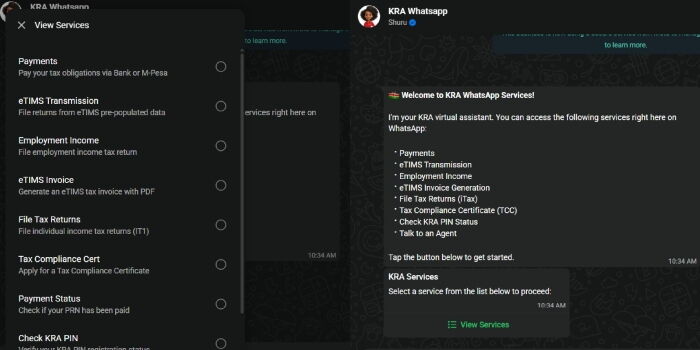
With just two weeks remaining before the annual tax return filing deadline, the Kenya Revenue Authority (KRA) is encouraging taxpayers to take advantage of its WhatsApp-based Shuru Chatbot, a platform designed to simplify access to key tax services from the convenience of a mobile phone.
Launched in April this year, the Shuru Chatbot enables taxpayers to access various KRA services through WhatsApp, eliminating the need for physical visits to tax offices or navigating complex online systems.
The service operates through KRA’s official WhatsApp number, +254 711 099 999, and is aimed at making tax compliance easier, particularly for small business owners, traders, freelancers and individual taxpayers.
Through the chatbot, users can generate Electronic Tax Invoice Management System (eTIMS) invoices directly from their smartphones. To access the service, taxpayers only need to save the number on their phones, open WhatsApp and send the word “Hi” or “Menu” to initiate a conversation with the virtual assistant.
After selecting the eTIMS invoice option, users are required to log in using their KRA PIN. A one-time password (OTP) is then sent to the phone number registered with KRA for verification purposes.
The chatbot guides users through the invoice generation process by prompting them to enter details such as the goods or services sold, quantity and selling price. Once the information is confirmed, a compliant eTIMS invoice is generated instantly and made available for download or sharing with customers.
KRA says the platform was developed with ordinary Kenyans in mind, with the goal of making tax compliance as simple as sending a WhatsApp message.
Beyond eTIMS invoicing, the Shuru Chatbot also offers a range of services including PIN registration, filing of Turnover Tax, Value Added Tax (VAT), Pay As You Earn (PAYE), Rental Income Tax returns and generation of Tax Compliance Certificates (TCCs).
As the June 30 filing deadline approaches, KRA is urging taxpayers who own smartphones and have access to WhatsApp to utilize the platform to file returns and access tax services quickly and conveniently, helping them avoid last-minute rushes and potential penalties for non-compliance.
Step by Step on how to file tax returns using the KRA Shuru WhatsApp Chatbot
As the June 30 tax return filing deadline approaches, taxpayers can now file their returns conveniently through KRA’s Shuru Chatbot on WhatsApp.
Step 1: Save the KRA WhatsApp Number
Save +254 711 099 999 on your phone contacts.
Step 2: Open WhatsApp
Launch WhatsApp and start a chat with the saved KRA number.
Step 3: Start the Conversation
Send “Hi” or “Menu” to activate the Shuru Chatbot.
Step 4: Select Tax Filing Services
The chatbot will display a menu of services. Choose the option for Tax Return Filing.
Step 5: Log In
Enter your KRA PIN when prompted.
Step 6: Verify Your Identity
A One-Time Password (OTP) will be sent to the phone number registered with your KRA account. Enter the OTP to proceed.
Step 7: Choose the Tax Type
Select the type of return you want to file, such as:
- Nil Return
- Turnover Tax (TOT)
- Value Added Tax (VAT)
- Pay As You Earn (PAYE)
- Rental Income Tax
Step 8: Provide Required Information
Follow the chatbot prompts and enter the requested details accurately. The information required will depend on the type of tax return being filed.
Step 9: Review Your Details
Carefully review all the information entered to ensure it is correct before submission.
Step 10: Submit the Return
Confirm and submit your return through the chatbot.
Step 11: Receive Confirmation
Once successfully filed, the system will generate an acknowledgement or confirmation message for your records.
Other Services Available on Shuru Chatbot
Besides tax return filing, taxpayers can also:
- Register for a KRA PIN
- Generate eTIMS invoices
- Apply for a Tax Compliance Certificate (TCC)
- Access various taxpayer support services
KRA says the Shuru Chatbot is available 24/7 and is designed to make tax compliance easier and more accessible for taxpayers across the country.